


Wir verwenden Cookies

Wir nutzen Cookies auf unserer Website. Einige sind notwendig, während andere uns helfen, diese Website und Ihre Erfahrung zu verbessern.

Ich akzeptiere

Individuelle Cookie Einstellungen

Nur notwendige Cookies akzeptieren

Datenschutzerklärung Impressum

Datenschutzeinstellungen

Hier finden Sie eine Übersicht über alle verwendeten Cookies. Sie können Ihre Zustimmung zu ganzen Kategorien geben oder sich weitere Informationen anzeigen lassen und so nur bestimmte Cookies auswählen.

Cookies für Statistiken

Statistik Cookies erfassen Informationen anonym. Diese Informationen helfen uns zu verstehen, wie unsere Besucher unsere Website nutzen.

Cookie Informationen anzeigen

Google Conversion-Tracking-Tag

Speichern

ZurückNur notwendige Cookies akzeptieren

Datenschutzerklärung Impressum

  • Zum Hauptmenü springen
  • Zum Seitenmenü springen
  • Zum Inhalt springen
  • Zum Fußbereich springen
  • Kontrast
  • Barrierefreiheit
  • de
  • en
Logo htw saar – Zur StartseiteLogo htw saar – Zur Startseite
Suchen
  • Preparing your stay
  • Other Insurances for exchange students
  • Forms
  • Visa and entry information
  • Kontakt
  • Standorte
  • Bibliothek
  • Mensaplan
  • Moodle
 
  • htwsaar
  • Internationales
  • International Office
  • Incoming exchange students
  • Preparing your stay
  • Online Enrolment

For your upcoming studies at htw saar you need to enroll online via the SIM platform of htw saar. This guide will assist you with the enrolment procedure, please carefully read the information and follow the different steps.

Deadline for submitting the online-enrolment is: 18.09.2026

We have created a video for you to follow every step that you can also read further below. Please watch the video!!

Enrollement Guide for Exchange Students

Wenn Sie externe Videos von YouTube aktivieren, werden Daten automatisiert an diesen Anbieter übertragen.

Key information:

  • Access and registration via:  sim.htwsaar.de/bewerbung
    • Always use the latest version of one of the following browsers: Google Chrome, Mozilla Firefox, Microsoft Edge based on Chromium
    • Apple Safari and Internet Explorer are not fully supported
  • Always exit the SIM application portal using the Log off button and then close the browser.
  • Using the application interface: Navigate to the different sections using the navigation menu on the left side of the window
  • Mandatory fields are indicated by a red asterisk 
  • For help texts click on the " i " symbol
  • For your draft application, click on "Save and Return"
  • Upload of documents: permissible file formats are JPEG/JPG or PDF.
  • If you are having technical issues with the SIM application portal, please send your questions to: sim-support@hiz-saarland.de (always provide your "Antrags-ID" starting with 1000000)
  • If you have any questions about the content of of the online enrolment application after reading this guide, please make a screenshot of the respective section and send an email to: incoming@htwsaar.de (always provide your "Antrags-ID" starting with 1000000)

Registering with the SIM application portal

  1. Visit the folllowing page: sim.htwsaar.de/bewerbung
  2. Switch language by clicking on the symbol in the very upper right corner, then on " Sprache & Region wählen" / "Select Language & Region", choose English from the drop-sown menu and click "Speichern"/"Save". Note: The language you set here is your language of communication. This means that you will receive future mail messages in this language
  3. Click on "Create account"
  4. Enter the required data when promted. Note: Please enter an email adress that you can access reliably at all times over the entire application period.
  5. After a few minutes you should receive an automatic verification email at the email address you specified. The email will ask you to use your existing login ID or to log in using the username specified in the email (make sure that English is the selected language!).
    Note: If you have not received the verification email after 15 minutes, please check your email spam folder. After receiving the verification email, you have 24 hours in which to click on the link in the email, enter your username and password and then click on "log in" to activate your user account. If you do not activate your account within 24 hours, you will need to go through the "create account" process from the start.

If you have forgotten your password, click on the "Forgot Password" button.

Applying for your degree program

1. Click on the registration tile “Enrolment Winter semester (Exchange students…)” 
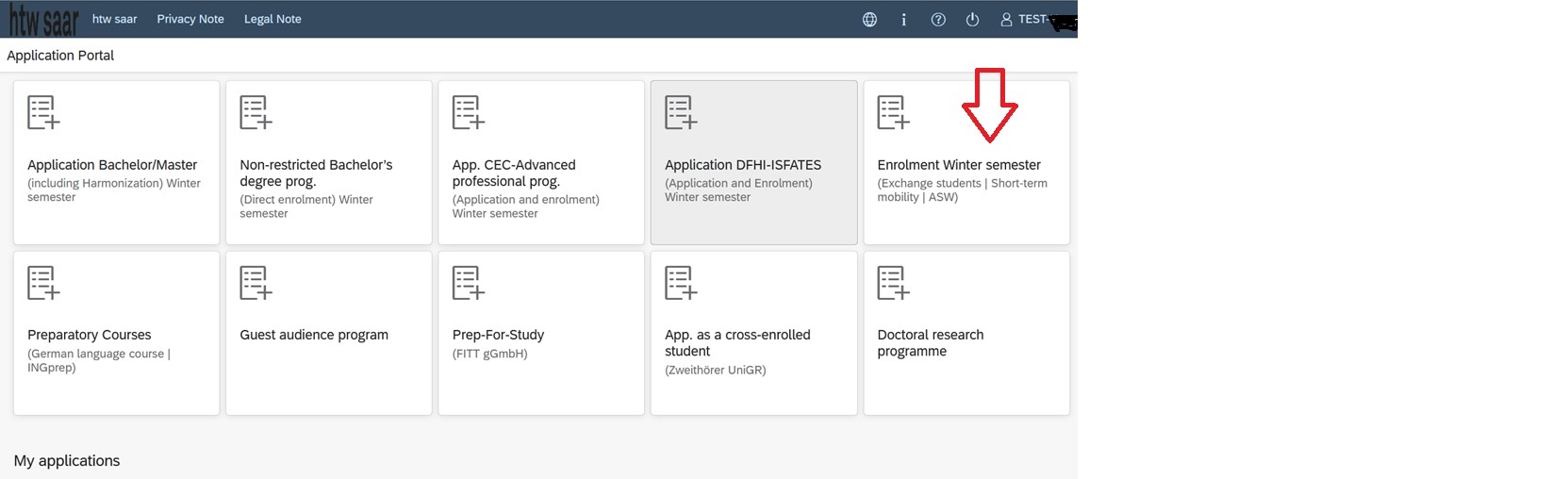
2. List of academic programmes: select the respective application 'Exchange students (Letter of admission from International Office)'

3. Select the study programme in which you will be enrolled at htw saar (see your acceptance letter) 
Note: Students of the EPS programme also have to select the study programme mentioned in their acceptance letter.

 

4. Select the indicated semester under "Intended Semester"  

Note: You can navigate through the application via the menu on the left side.

5. Only complete the mandatory fields with your personal details on the next page:
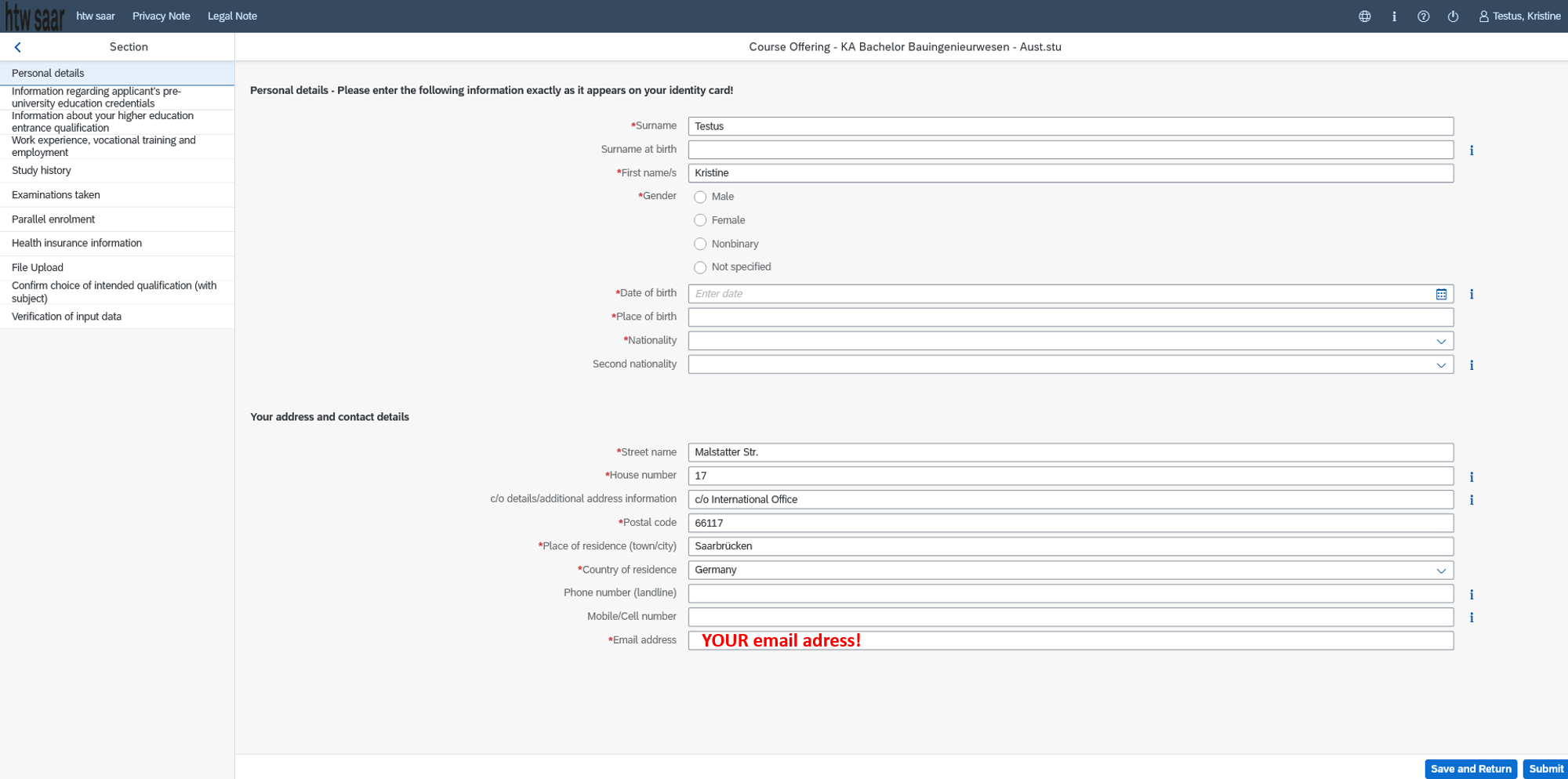
(Your nationality (=Citizenship): Country from which you hold a passport)

Important:
We strongly recommend to fill the postal address of the International Office under 'Your address and contact details'. This way, your student ID card cannot get lost while shipped.
Address: 
  Malstatter Str. 17
  c/o International Office
  D-66117 Saarbrücken
We will then collect it from the central student administration and hand it over to you.

6. Only complete the mandatory fields with your pre-university educational credentials
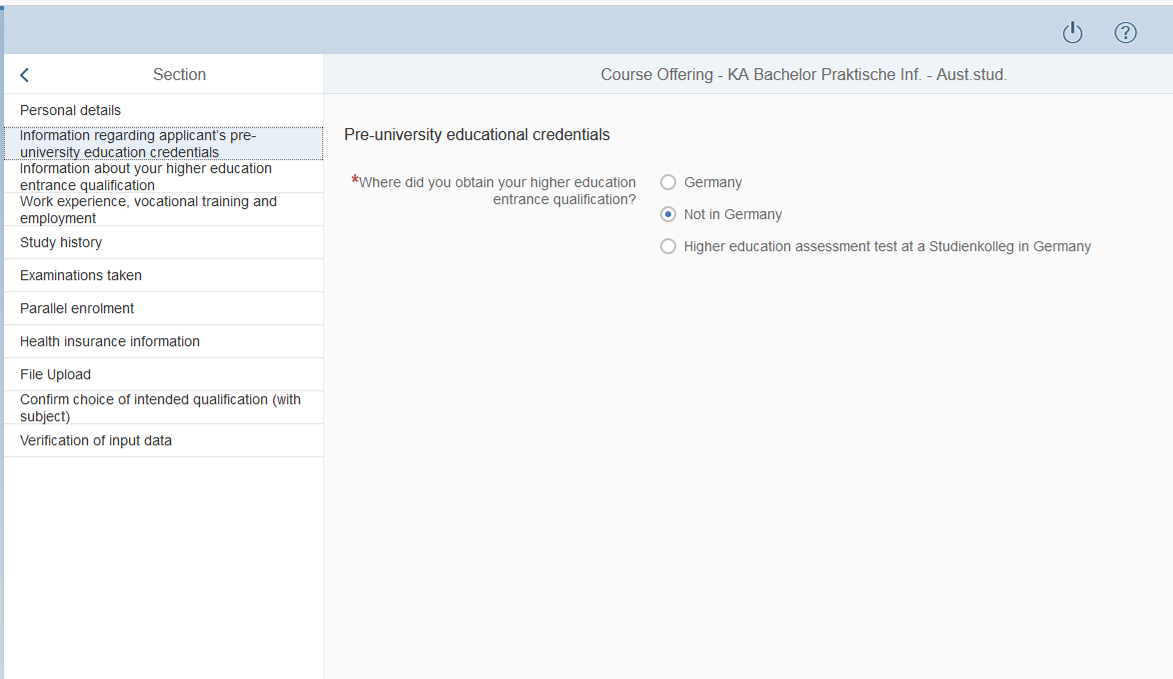
(Higher education entrance qualification = „HEEQ“: secondary school leaving certificate qualifying for university admission and matriculation)

7. Only complete the mandatory fields about your higher education entrance qualification
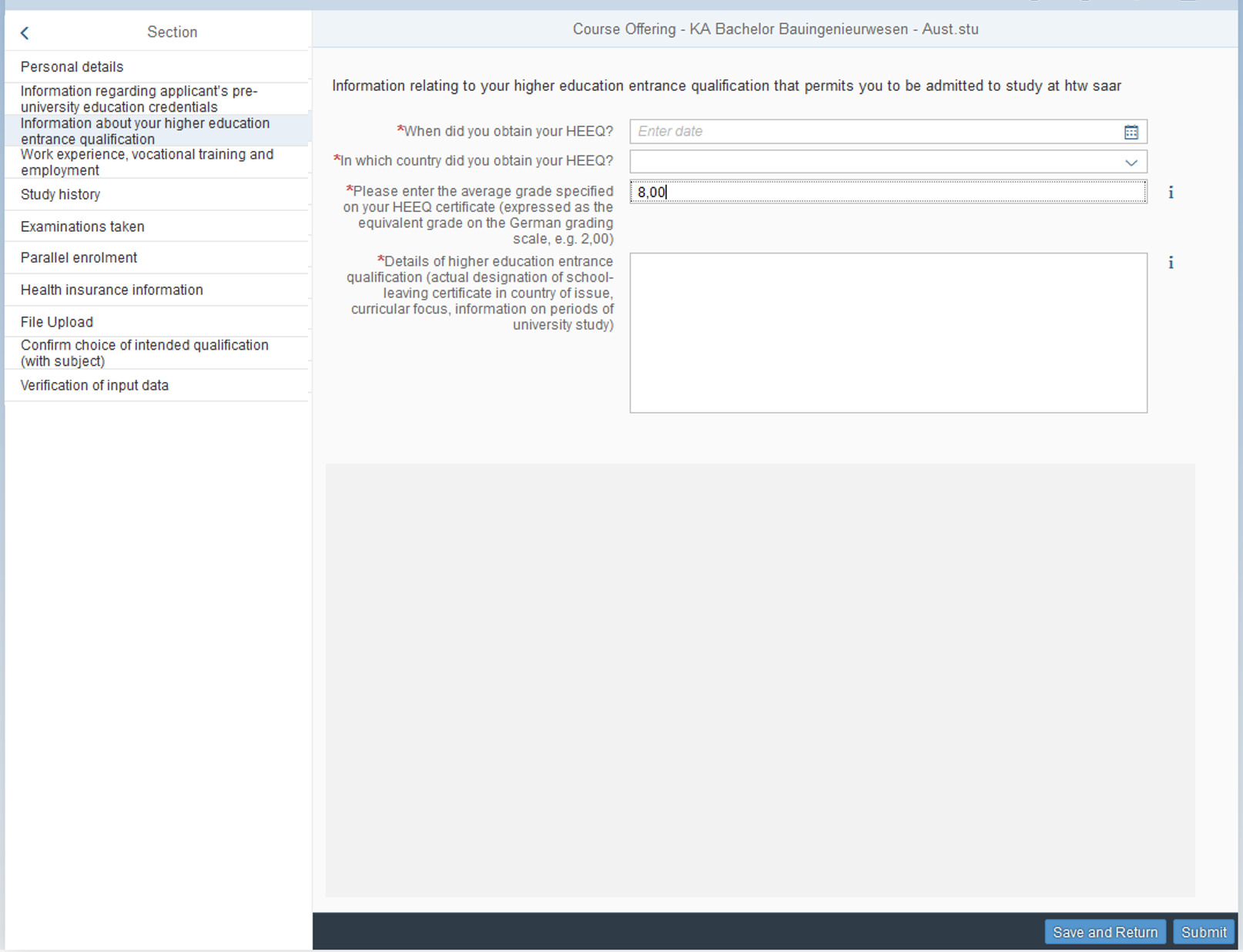
As average grade enter "8,0"
For the details, enter the actual designation/ name of your higher education entrance qualification/secondary high school certificate in your country (e.g. Baccalaureat, A-/O-Level, Matura etc.).

8. The next page about your work experience is pre-filled (both options "No"), you do not need to enter any additional data.

9. Only complete the mandatory fields about your study history.
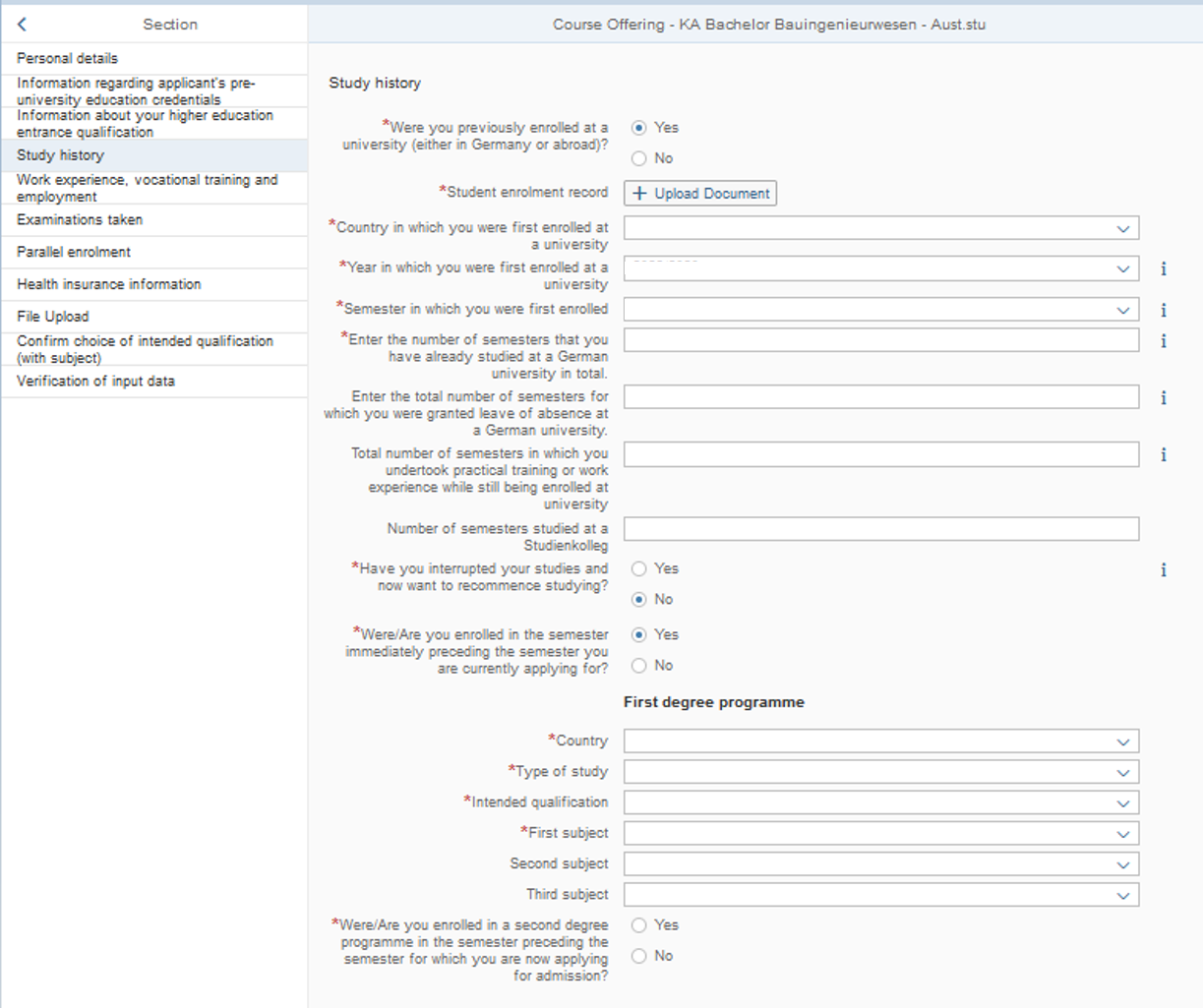
Notes:

  • Student enrolment record: Upload a scan of your current certificate of enrolment of your home university that states that you are a student there during this current academic year. Do NOT upload your transcript of records with your grades here!!
  • Country in which you were first enrolled at a university: e.g. if you enrolled at a university in France first and later moved to Finland for continuing or starting a new study program there, please select France as the country where you first enrolled at a university.
  • Year and * Semester in which you first were enrolled at a  university: e.g. if the month of your first enrolment was between January and June 2023 select year “2022/23” and summer semester.  If the month of your first enrolment was between July and December 2023, select year “2022/23” and winter semester
  • Type of study: select first study for an undergraduate degree (Bachelor‘s) or second study for a graduate degree (Master‘s) or Consecutive Master Programme if you are enrolled in a consecutive Master‘s programme at home
  • Intended qualification: 
    Select the qualification that you are studying towards at your home university: 
    - ‘Master’s degree from a university (not completed)’ if you are currently in a Master’s program OR  ‘Bachelor’s degree or equiv. (not completed)’ if you are currently in a Bachelor’s program
  • First subject: 
    Select the German designation of the degree programme that you will find in your acceptance letter (selection is unfortunately only possible in German at this stage). Students of the EPS programme also need to select the name of the study programme mentioned in their acceptance letter!

10. Only complete mandatory fields about your examinations taken
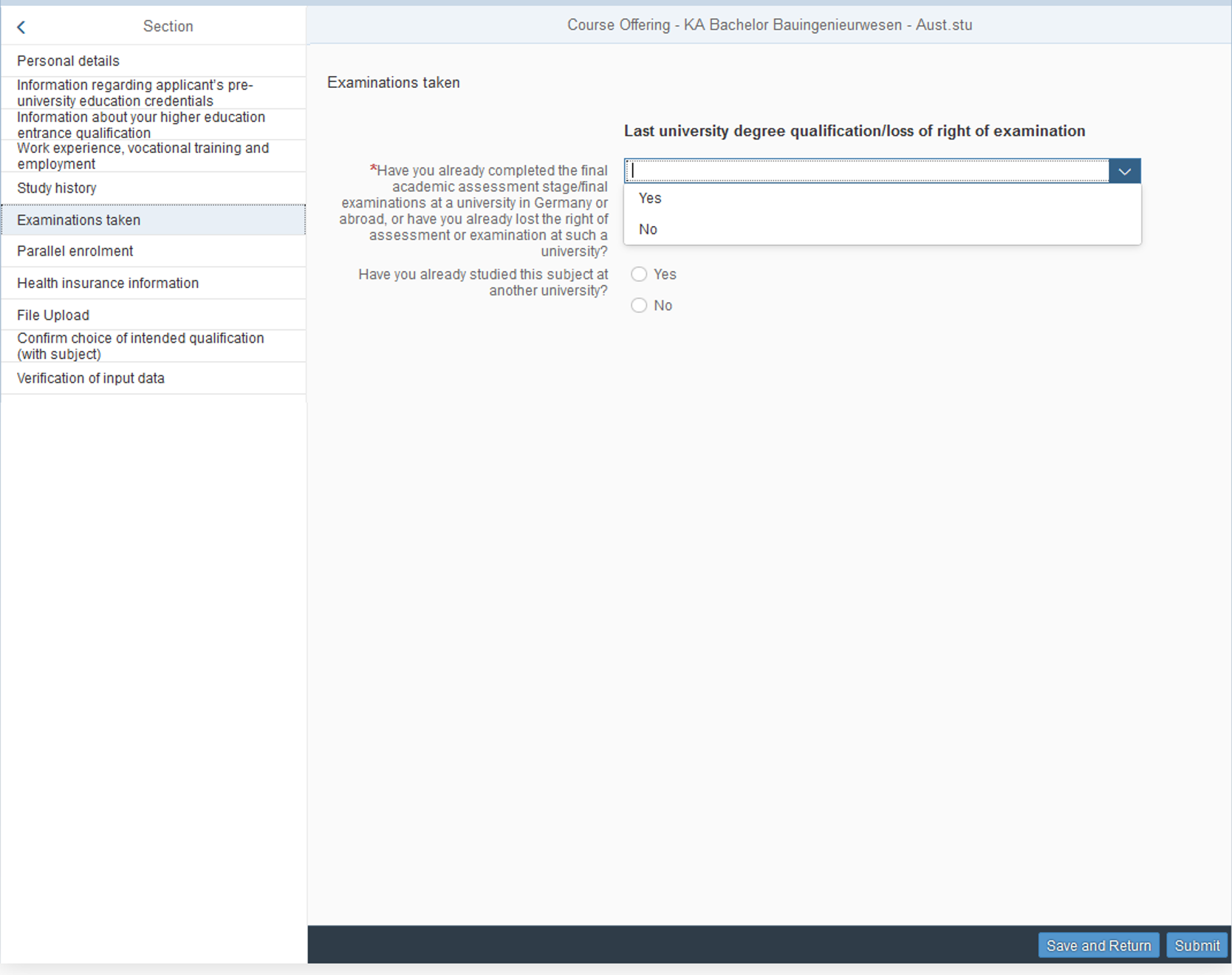
Notes:
Have you already studied this subject at another university:

  • select ‘No’ if the study programme at your home university is different from the study programme you are being enrolled at htw saar (see admission letter)
  • select ‘Yes’ if your study programme at your home university corresponds with the study programme you are being enrolled at htw saar (see admission letter). An upload (*Certificate of no impediment) is required but you can just upload a simple blank sheet of paper.

10.a If you have selected "yes" on the previous page and hold a first diploma (e.g. Bachelor's degree), fill out the mandatory fields
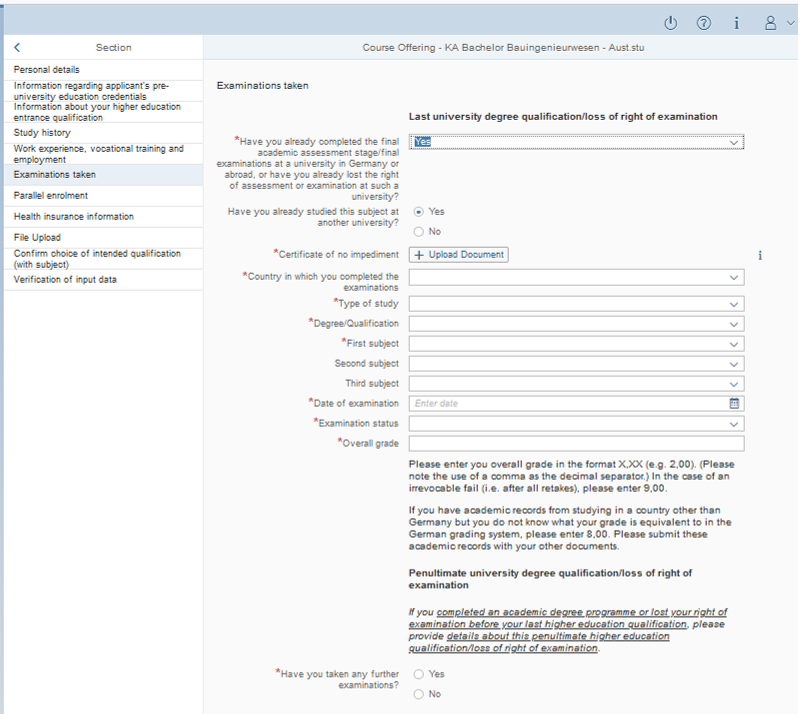

Notes:

  • Also answer the question "Have you already studied this subject at another university" with either yes or no. If you select yes, upload a blank sheet of paper with the upload link below.
  • Type of study: the typical selection is ‘First study"
  • Degree Qualification: the typical selection is either Bachelor’s degree from a University OR Bachelor’s degree from a University of Applied Science
     
  • First subject (Name of study programmes are in German only. If you need help with this, please use Google translator in order to find a match (approximate match is sufficient!)
  • Overall grade: enter 8,0. No upload of academic records required!
  • If you have taken any further examinations, tick yes and fill out the further fields

11. At the next page "Parallel enrolment", select "yes" as you will also stay enrolled at your home university. Fill in the other mandatory fields.

12. Health Insurance: NOT possible without PRIOR action from your side!! Please see our information about health insurance here and on the bottom of this webpage, under "Health Insurance, which case applies to you?"
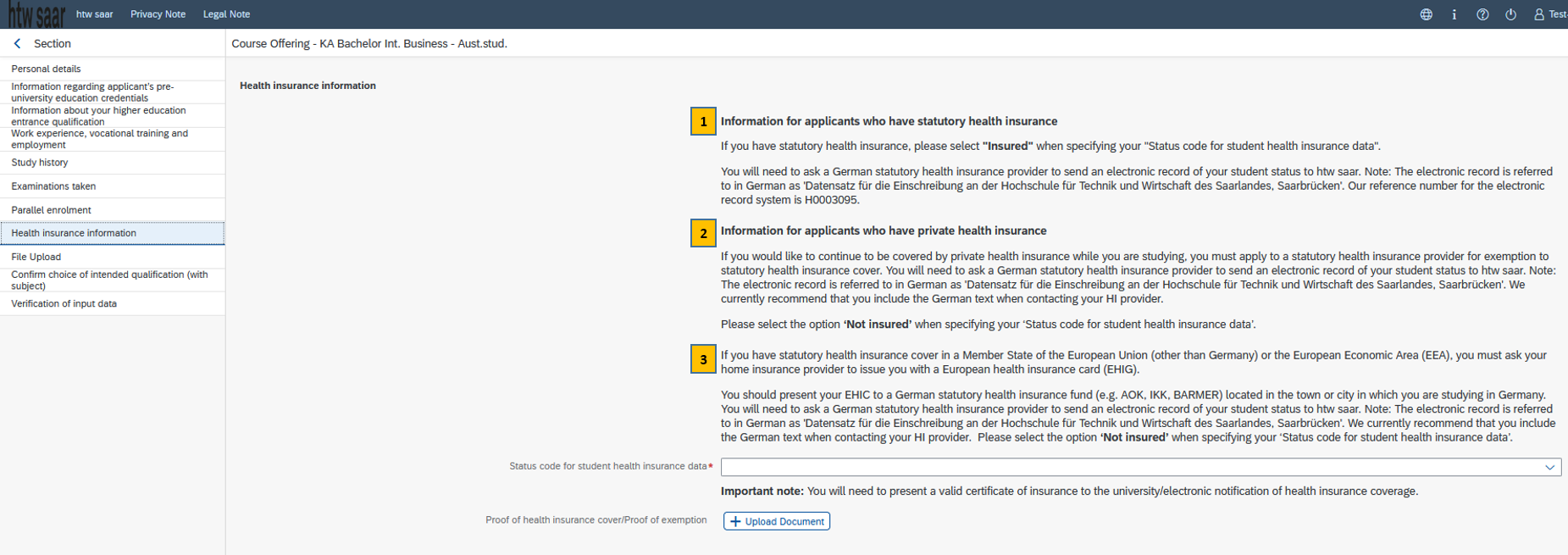
Note:
1: Student health insurance from a statutory German health insurance fund
2: Private health insurance from outside Germany or from a German private health insurance provider
3: Statutory health insurance from a EU member state → Students with an EHIC card
-> In all 3 cases, please follow the instructions about health insurances here.

13. Upload your files

  •  Small sized picture that will be used for your htw saar ID-card (please upload a small sized picture in jpg format)
  •  Upload your ID document (copy of national ID card, students from overseas upload a copy of their passport)
  •  Upload acceptance letter from the International Office

14. The next page about the confirmation of intended qualification is pre-filled, you do not need to enter any additional data.

15. Transfer of the semester fee
Paying the semester fee*: all exchange students need to wire the fee through a bank account that participates in the European IBAN bank transfer system (deadline is 18 September, better some days before this date!) before submitting the enrolment application. We strongly recommend that students from outside of the EU who are not able to transfer the fee through an IBAN account open a bank account with an online bank (also facilitates the next steps like transfer of the rent etc.). In some few exceptional cases, the amount can be paid in cash at htw saar’s cashiers office upon arrival. Student from outside the EU who cannot open an bank account with an online bank should send us a notice asap to incomingnoSpam@noSpamhtwsaarnoSpam.de .
*Semester fee: this fee is not a tuition fee, but a mandatory social fee charged to all students by the student union covering free public transport in state of Saarland AND within whole Germany - the so-called “Deutschland(semester)ticket” for all busses, trams and regional trains all over Germany - as well as access to the sports and cultural facilities, food services and other student services.

Exchange students need to transfer 363,30 € to the following bank account:
Recipient: HTW Saarland
Bank: Landesbank Saar (Saar LB)
IBAN: DE67 5905 0000 0031 5200 34
BIC: SALADE55XXX
Reference: 262, first name, last name and date of birth (as currently the applicant number=„Bewerbernummer“, starting with 502… is not being displayed in the system, these 4 items are sufficient for the wire)

16. Verification of input data / Declaration (in lieu of oath)

  • make sure to tick the box ‘I hereby confirm the disclosures and declarations made above’
  • ‘Proof of payment of semester fee’: submit proof of payment as a PDF. Enrolment cannot be finalized until the semester fee has been credited in full to the htw saar account.
  • ‘Other documents’: no additional uploads are required

17. Click "Submit" in the very low right corner

18. Confirm the information you have supplied (click on "Commit")
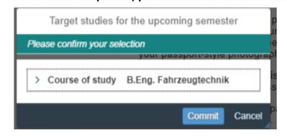
You will receive on-screen confirmation that your application was submitted and you will be notified of your "Antrags-ID", starting with 1000000.

19. Find your application as a tile in the section "My Applications" of your start page (If you do not see a new tile, please clear your browser cache using the key combination CTRL+F5)

  • If you still cannot see it, please check - well before the enrolment deadline is due to expire - that you did actually send your enrolment application via the "Submit" button and that you did not simply save it without submitting it.
  • If the status of your application is still not showing as "Application submitted" please contact the Admissions Office by email (stud-sek@htwsaar.de) quoting your applicant number/'Bewerbernummer', starting with 502... or your "Antrags-ID" starting with 1000000.

Thank you for submitting your enrolment form by the deadline!

What happens after you paid the semester fee and have submitted the enrolment form:

The htw saar Admissions Office will process your enrolment form. If the data and the uploaded documents are accurate and the semester fee has been booked to the university‘s bank account, you will receive an email of the Admissions Office about the official admission document for download, along with the IT-datasheet required for the registration of the htw saar IT infrastructure (e.g. SIM-study portal, Moodle, htw saar email account, etc.). Upon log-in to the SIM-study portal, you can download your certificate of enrolment, change your address, see your grades (after exam period). Furthermore, you will receive your student ID card, created by the Admissions Office, from the International Office by end of March/beginning of April. Last but not least, with your successful enrolment, you will be able to register for the Deutschland(semester)ticket which grants free public transport within whole Germany. Our Student Buddies will guide you through the process if required.

Health Insurance, which case applies to you?

For enrolment (registration) at any German university, every student must have sufficient health insurance. The new online procedure between universities and the public German student health insurance funds ("Gesetzliche Krankenkassen") requires that all students enrolling in a university first contact one of the statutory health insurance funds and inform them about their upcoming studies and their current health insurance status. The German health insurance provider will then submit a digital status notification to the university, indicating whether the student holds German public health insurance or is exempted from it. For students who need to contract a student health insurance in Germany, the health insurance provider (see some companies below), will do this automatically.
The electronic record serves as proof of valid health insurance for the students' enrolment. One of the following 4 cases should apply to you, depending what kind of health insurance you hold at home, if you got the proof of exemption or if you over 30 years old. 

You need to take out statutory student health insurance, and to do so, you must choose one of the listed providers below and apply for membership with them. Once you've applied, you will receive membership documents and information on the payment procedure. The required documents/information for the application include:

  • Last name, first name
  • Admission letter from the International Office
  • Address in Germany or at home
  • Personal ID document or passport
  • Passport-sized picture (as an electronic file)
  • Reference number of htw saar: H0003095

The selected health insurance fund will then submit an electronic record to the htw saar admissions office, confirming your health insurance status.

If you are an exchange students who holds a private health insurance with unlimited coverage scope in your home country (NO travel insurance) and you want to continue being covered by this private health insurance during your exchange studies, you must apply to a statutory health insurance provider for assessment and exemption from statutory German student health insurance cover.

You need to contact one of the listed providers below and apply for an exemption from the German statutory student health insurance. The required documents/information for the exemption application include:

  • Last name, first name
  • Admission letter from the International Office
  • Address in Germany or at home
  • Personal ID document or passport
  • Reference number of htw saar: H0003095

-> If the assessment is POSITIVE, this health insurance fund will submit an electronic record to the htw saar admissions office that you are not insured in Germany (=proof of exemption) for your enrolment.
->If the assessment is NEGATIVE, you need to take out German statutory student health insurance (see 1) and the health insurance fund will submit an electronic record (‘insured with a public health insurance fund’) to the htw saar admissions office for your enrolment.

If you are an exchange students aged over 30 you are required to send your private health insurance certificate to a statutory health insurance provider so that they can
submit the status notification to htw saar.

You need to contact one of the listed providers below and inform them about your upcoming enrolment at htw saar, specifically mentioning that you are 30 years old or older. The required documents/information for this notification include:

  • Last name, first name
  • Admission letter from the International Office
  • Address in Germany or at home
  • Personal ID document or passport
  • Private health insurance policy*
  • Reference number of htw saar: H0003095

Upon receiving this information, the health insurance fund will submit an electronic record to the htw saar admissions office, confirming that you are not insured in Germany (=proof of exemption).

*Important note: You need to show proof of a private health insurance.
We recommend to take out the German private student health insurance policy VELA Optimal (current rate about 78€ per month) - this tariff is officially recommended by the Deutsche Studentenwerk (German National Association for Student Affairs), see: http://www.internationale- studierende.de/en/on_arrival/health_insurance/what_if_im_over_30/

Less coverage scope and therefore less recommended:
- Mawista , tariff Mawista Student, see: https://www.mawista.com/en/health-insurance-for-foreign- nationals-in-germany/health-insurance-for-students/
- Care Concept with tariff Care Student (up to age 34), Care College (up to 35) or Care Economy (up to 40), see: https://www.care-concept.de/krankenversicherung/vergleich/auslandskrankenversicherung_tf_eng.php?vmnr=Y000000002&navilang=eng

If you are an exchange student from an EU/EFTA member state holding an EHIC or similar document, you do not have to take out student health insurance in Germany.

You need to contact one of the listed providers below and inform them about your upcoming enrolment at htw saar. The required documents/information for this notification include:

  • Last name, first name
  • Admission letter from the International Office
  • Address in Germany or at home
  • Personal ID document or passport
  • Copy of both sides of EHIC, GHIK, or AT11 chip card (European Health Insurance Card or a similar document)
  • Reference number of htw saar: H0003095

Upon receiving these documents, the health insurance fund will submit an electronic record to the htw saar admissions office, confirming that you are not insured in Germany.

*Important note: The expiry date of the EHIC card has to exceed either 31 March for students coming for the winter semester or 30 September for students coming for the summer semester. The EHIC itself should be presented whenever you consult a doctor!! If you have a student job (max. 20hrs/week is allowed for students, otherwise additional fees apply), you need to take out the statutory German student health insurance for the period of your work contract!!

Templates for the notification

For case 2 and 3: you can either send an email and use the template. Alternatively, the Techniker Krankenkasse offers a digital platform for this (further information, see below under Techniker Krankenkasse).

Please attach the following documents to your email:

  • Copy of current health insurance document
  • Copy of personal ID document (or passport)
  • Copy of your admission letter that you received from us some weeks ago

Reference: Prüfung meiner privaten ausländischen Krankenversicherung und elektronische Meldung meines Krankenversicherungsstatus an Meldenummer H0003095 (htw saar, Saarbrücken)

Sehr geehrte Damen und Herren,
mein Name ist YOUR NAME, ich bin ab 1.04.2026 Austauschstudent/in an der Hochschule für Technik und Wirtschaft des Saarlandes (htw saar), Saarbrücken. Für meine Einschreibung benötigt die htw saar eine elektronische Meldung über meinen Krankenversicherungsstatus. Im Anhang finden Sie meine private Krankenversicherung mit der Bitte zu prüfen, ob ich damit von der studentischen Krankenversicherungspflicht befreit werden kann. Neben einer Kopie meines Ausweisdokuments finden Sie auch den Zulassungsbescheid des International Office der htw saar (die Immatrikulationsbescheinigung erhalte ich erst nach meiner Einschreibung). Meine Adresse in Saarbrücken lautet:

FILL IN YOUR FULL ADRESS IN GERMANY OR AT HOME HERE

Bei Befreiung senden Sie bitte den “Datensatz für die Einschreibung an der Hochschule für Technik und Wirtschaft des Saarlandes, Saarbrücken” an die Meldenummer H0003095 (Studierendensekretariat der htw saar), damit meine Einschreibung finalisiert werden kann.

Mit freundlichen Grüßen
First name, last name

If you are Case 4, you can either send an email and use the template. Alternatively, the Techniker Krankenkasse offers a digital platform so that you can submit your documents via it (further information, see below under Techniker Krankenkasse).

For the email, please attach the following documents:

  • Copy of EHIC
  • Copy of personal ID document (or passport)
  • Copy of your admission letter that you received from us some weeks ago

Reference: Elektronische Meldung meines Krankenversicherungsstatus an die Meldenummer H0003095 (htw saar, Saarbrücken)

Sehr geehrte Damen und Herren,
mein Name ist YOUR NAME, ich bin ab 1.04.26 Austauschstudent/in an der Hochschule für Technik und Wirtschaft des Saarlandes (htw saar), Saarbrücken. Für meine Einschreibung benötigt die htw saar eine elektronische Meldung über meinen  Krankenversicherungsstatus. Als Unions-Bürger/in habe ich eine EHIC- Karte, die Sie im Anhang finden, ebenso wie eine Kopie meines Ausweisdokuments und den Zulassungsbescheid des International Office der htw saar (die Immatrikulationsbescheinigung erhalte ich erst nach meiner Einschreibung). Meine Adresse in Saarbrücken lautet:

FILL IN YOUR FULL ADRESS IN GERMANY OR AT HOME HERE

Bitte senden Sie den “Datensatz für die Einschreibung an der Hochschule für Technik und Wirtschaft des Saarlandes, Saarbrücken” an die Meldenummer H0003095 (Studierendensekretariat der htw saar), damit meine Einschreibung finalisiert werden kann.

Mit freundlichen Grüßen
First name, last name

For all cases (1-4) send your notification (templates see below) via email to ONE of the selected statutory health insurers listed below, located in Saarbrücken or nearby. You should mention the German name of the electronic record required by the htw saar admission office, which is "Datensatz für die Einschreibung an der Hochschule für Technik und Wirtschaft des Saarlandes, Saarbrücken." Please note that there is typically NO confirmation message once the electronic record has been sent, neither from the health insurance fund nor from the university.

AOK Saarland

szs.kl@service.rps.aok.de
www.aok.de/pk/rps
www.aok.de/pk/rps/kontakt/aok-vor-ort/
www.aok.de/kp/uni/information-for-international-students/

BARMER

service@barmer.de
https://www.barmer.de/en

IKK Südwest

info@ikk-suedwest.de
www.ikk-suedwest.de/geschaeftsstellen/saarbruecken/
https://ikk-suedwest.com/?lang=en

Techniker Krankenkasse

https://www.tk.de/en and https://www.landingpage.tk.de/htwsaar
Further questions can be addressed to: anika.schmidt@tk.de ( Student advisor: Ms. Anika Schmidt)

For assessment/exemption (case 2, 3 and 4): please submit your data via this website and follow the instructions:
Click on → ‘Receive confirmation’ which leads you to the page ‘Your insurance status’ where you select the country in which you hold health insurance and click on ‘Next’. Here, please select ’None of the above'. Then type ‘Saar’ in the field for University location or ID and you will be directed to the universities located in the federal state of Saarland. Very important: pay special attention to select Hochschule für Technik und Wirtschaft (Saarbrücken - H0003095) and select the start date of studies (1.10.2026). On the next pages you are asked for your personal details and need to submit your health insurance certificate (if you are privately insured) or a copy of your EHIC card, then complete the final steps and submit the form.  

DAK Saarbrücken

service756200@dak.de
https://www.dak.de/dak/english-2167614.html

Marion Hergenröther

Austauschstudierende (Incoming, Erasmus+) | Erasmus+ incoming exchange students

Malstatter Straße 17, 66117 Saarbrücken
 
  • Gebäude: Gebäude 11
  • Raum: 11.01.11
  • Telefon: +49 (0) 681 / 5867 -654
  • E-Mail: marion.hergenroethernoSpam@noSpamhtwsaarnoSpam.de
  • E-Mail:incomingnoSpam@noSpamhtwsaarnoSpam.de

Linus Wrona

Austauschstudierende (Incoming, außerhald EU) | Incoming students outside EU & Kurzaufenthalte | Short-term blended mobilities

Malstatter Straße 17, 66117 Saarbrücken
 
  • Gebäude: 11 CAS
  • Raum: 11.01.11
  • Telefon: +49 681 5867-364
  • E-Mail: linus.wronanoSpam@noSpamhtwsaarnoSpam.de

Auszeichnungen und Partner der htw saar

Footerbereich

  • Impressum
  • Datenschutz
  • Erklärung zur Barrierefreiheit
  • Cookieeinstellungen

sozialen Medien

  • Facebok
  • Instagram
  • LinkedIn
  • youtube
  • flickr
  • blog

Kontakt

Hochschule für Technik und Wirtschaft 
des Saarlandes
Goebenstraße 40
66117 Saarbrücken

Telefon: (0681) 58 67 - 0
Telefax: (0681) 58 67 - 122
E-Mail: infonoSpam@noSpamhtwsaarnoSpam.de

Standorte

  • Campus Alt-Saarbrücken
  • Campus Rotenbühl
  • Campus Göttelborn
  • HTZ am Innovations Campus Saar

htw saar

  • Pressemitteilungen
  • Bekanntmachungen
  • Semestertermine/Vorlesungszeiten
  • Arbeiten an der htw saar
  • Erste Hilfe / Brandschutz
  • Arbeits- und Gesundheitsschutz (AGUM)
  • IT-Notfälle
  • Strahlen- und Laserschutz
  • Webmailer
  • Intranet (für Beschäftigte)
  • Login (für Beschäftigte)

Aufsichtsbehörde:
Ministerium der Finanzen und für Wissenschaft des Saarlandes