


For your upcoming studies at htw saar you need to enroll online via the SIM platform of htw saar. This guide will assist you with the enrolment procedure, please carefully read the information and follow the different steps.
We have created a video for you to follow every step that you can also read further below. Please watch the video!!
Key information:
If you have forgotten your password, click on the "Forgot Password" button.
1. Click on the registration tile “Enrolment Summer semester (Exchange students)”

2. Select the tile ‘Enrolment Summer semester (Exchange students)'
3. Select the study programme in which you will be enrolled at htw saar (see your acceptance letter)
Note: Students of the EPS programme also need to select the study programme mentioned in their acceptance letter.

4. Select the indicated semester under "Intended Semester"
5. Only complete the mandatory fields with your personal details on the next page:
Note: You can navigate through the application via the menu on the left side.
Important:
We strongly recommend to fill the postal address of the International Office under 'Your address and contact details'. This way, your student ID card cannot get lost while shipped.
Address:
Malstatter Str. 17
c/o International Office
D-66117 Saarbrücken
We will then collect it from the central student administration and hand it over to you.
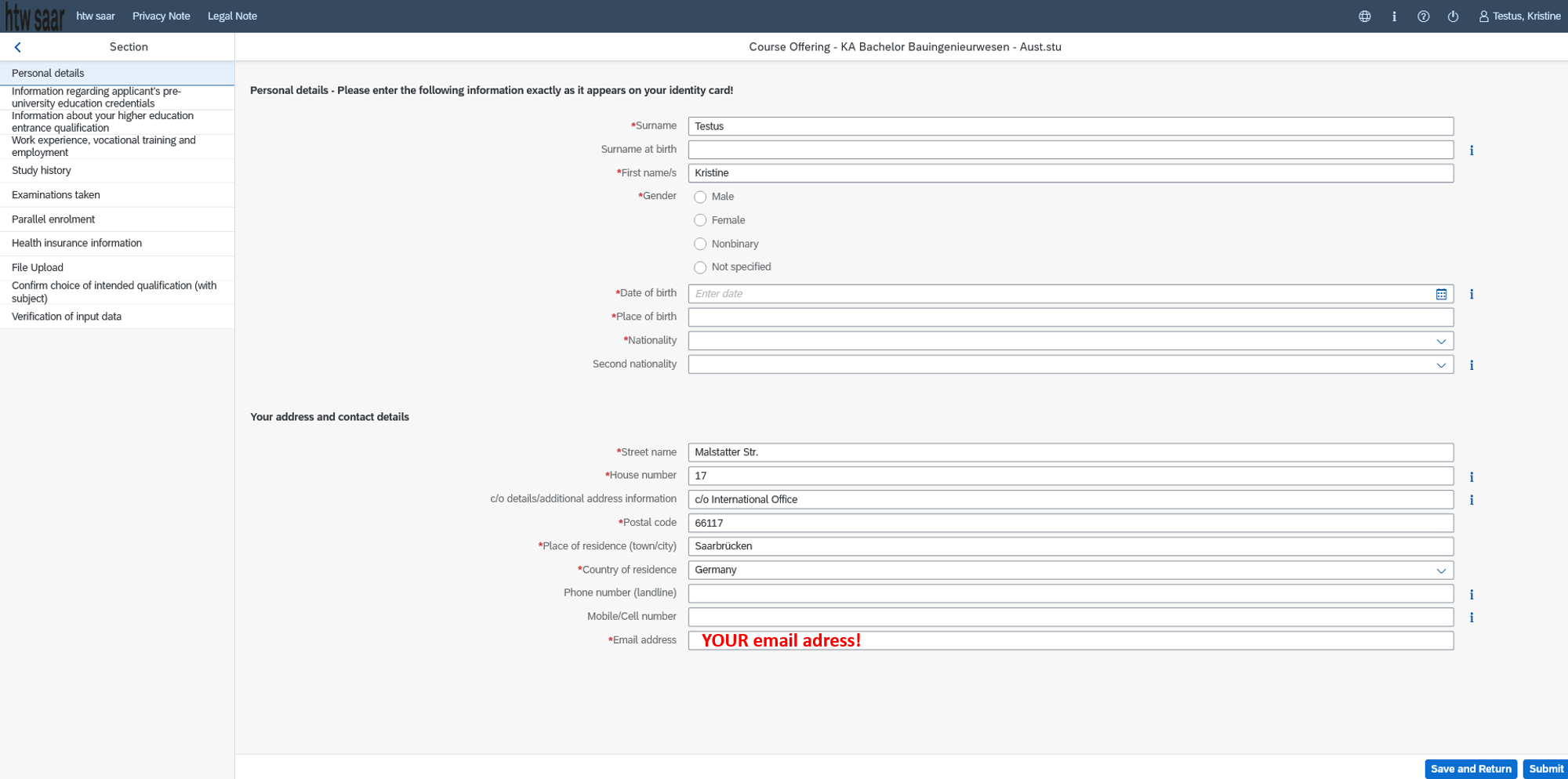
(Your nationality (=Citizenship): Country from which you hold a passport)
6. Only complete the mandatory fields with your pre-university educational credentials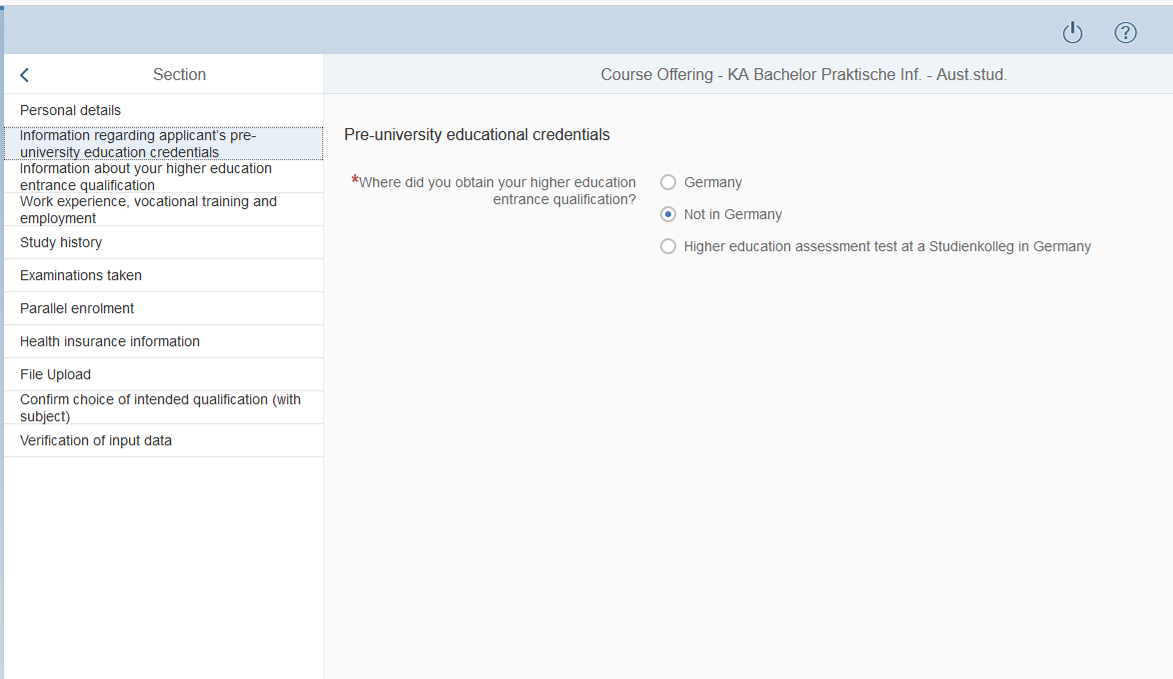
(Higher education entrance qualification = „HEEQ“: secondary school leaving certificate qualifying for university admission and matriculation)
7. Only complete the mandatory fields about your higher education entrance qualification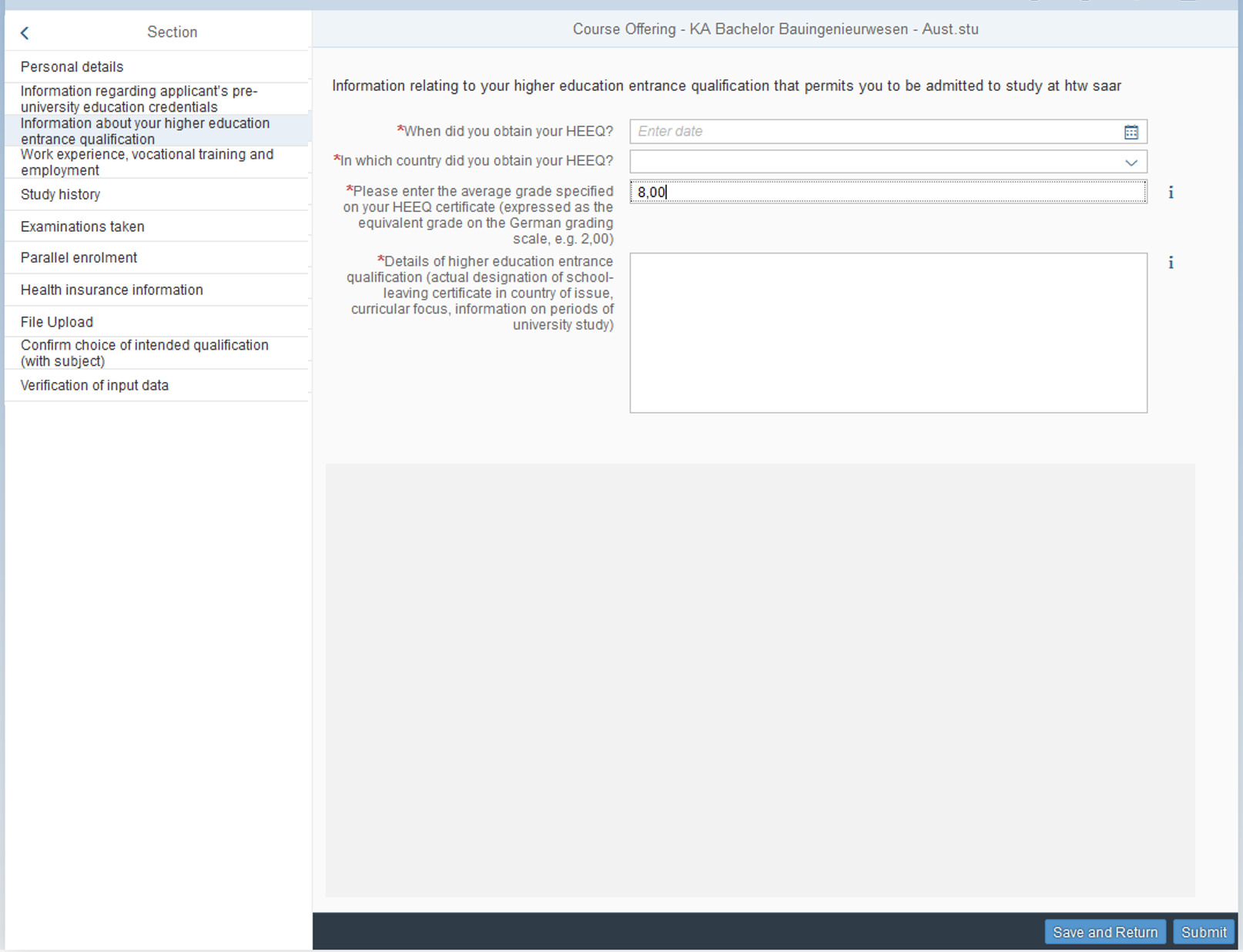
As average grade enter "8,00"
For the details, enter the actual designation/ name of your higher education entrance qualification/secondary high school certificate in your country (e.g. Baccalaureat, A-/O-Level, Matura etc.).
8. The next page about your work experience is pre-filled (both options "No"), you do not need to enter any additional data.
9. Only complete the mandatory fields about your study history.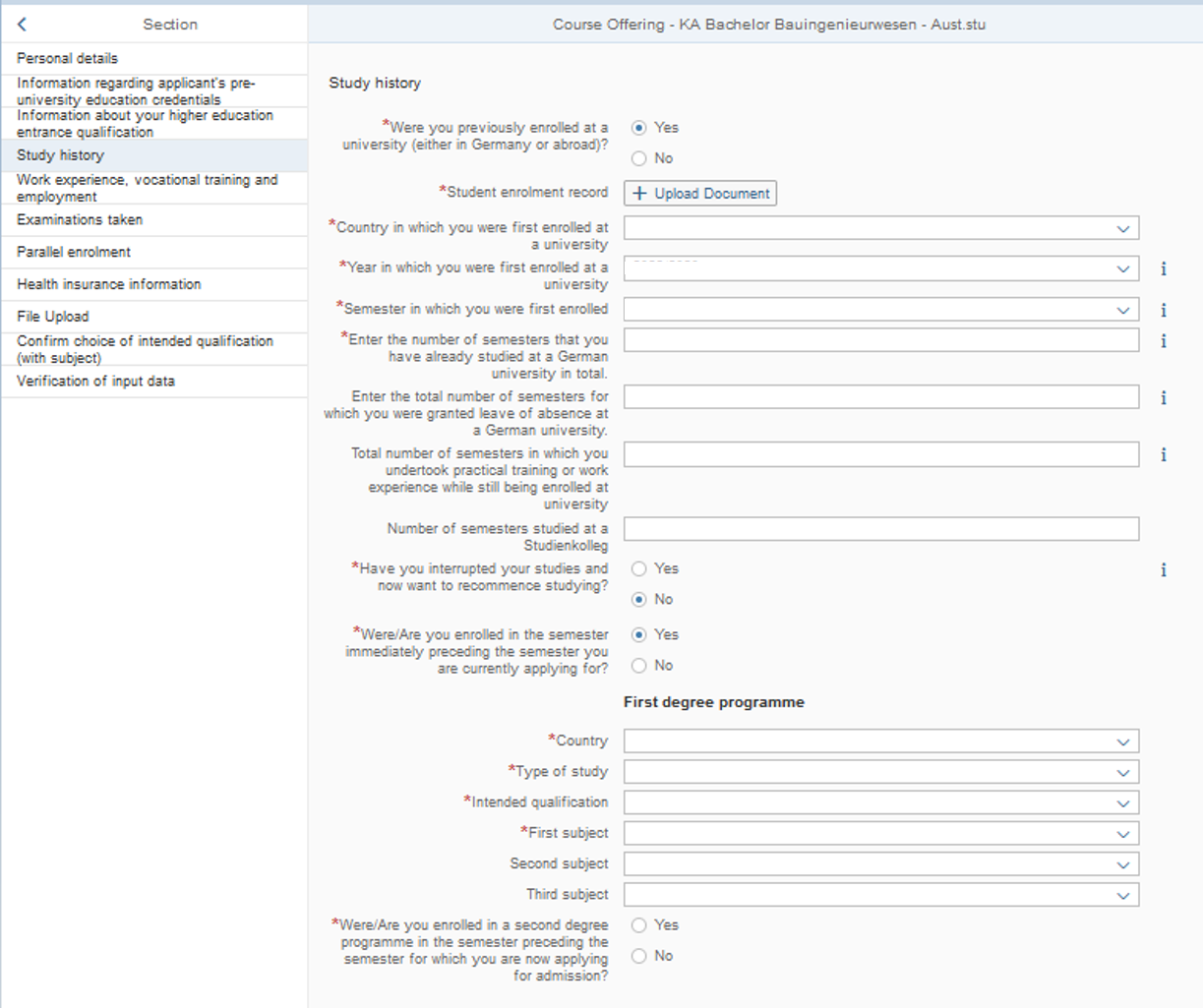
Notes:
10. Only complete mandatory fields about your examinations taken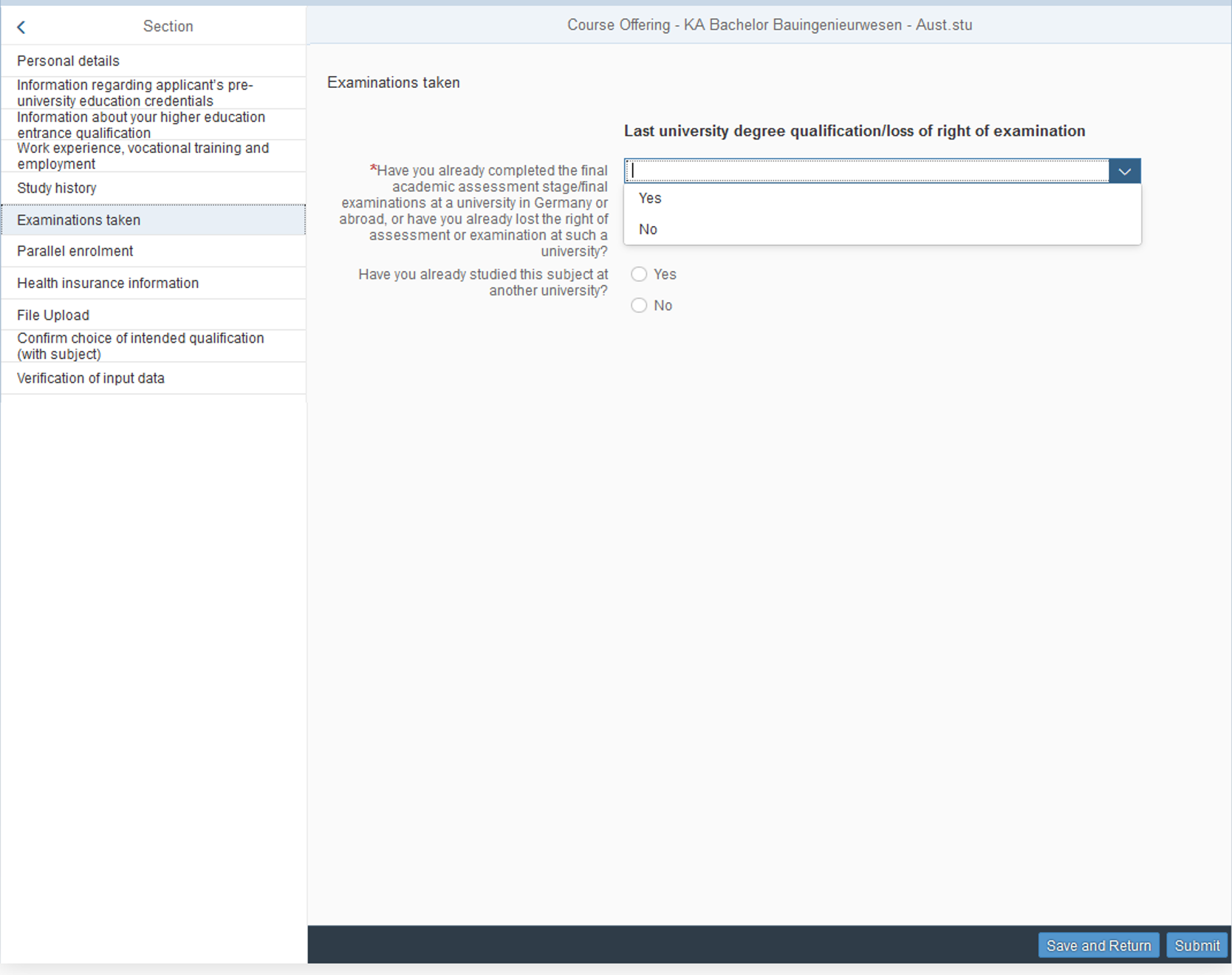
Notes:
Have you already studied this subject at another university:
10.a If you have selected "yes" on the previous page and hold a first diploma (e.g. Bachelor's degree), fill out the mandatory fields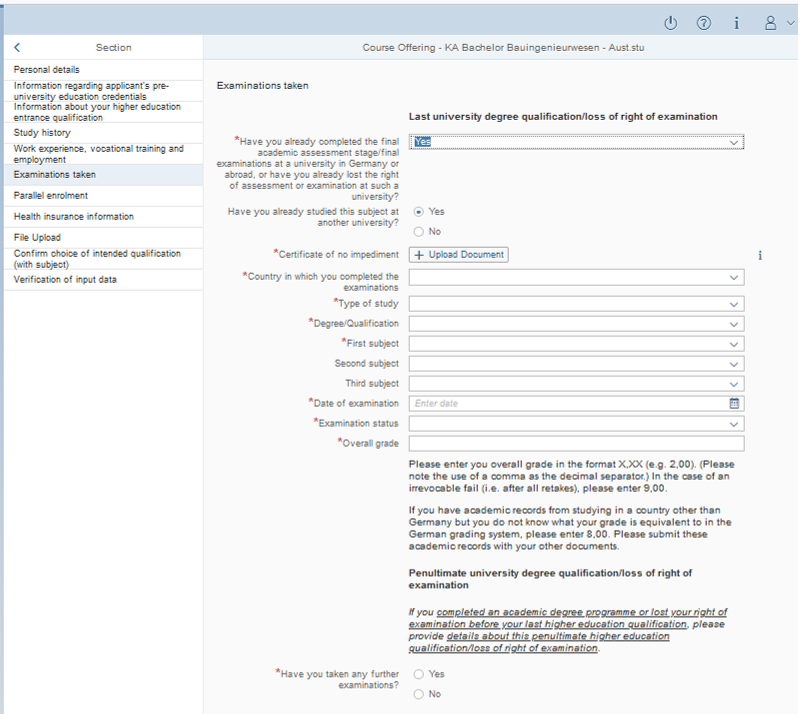
Notes:
11. At the next page "Parallel enrolment", select "yes" as you will also stay enrolled at your home university. Fill in the other mandatory fields.
12. Health Insurance: NOT possible without PRIOR action from your side!! Please see our information about health insurances here and on the bottom of this webpage, after 'What are the next steps..."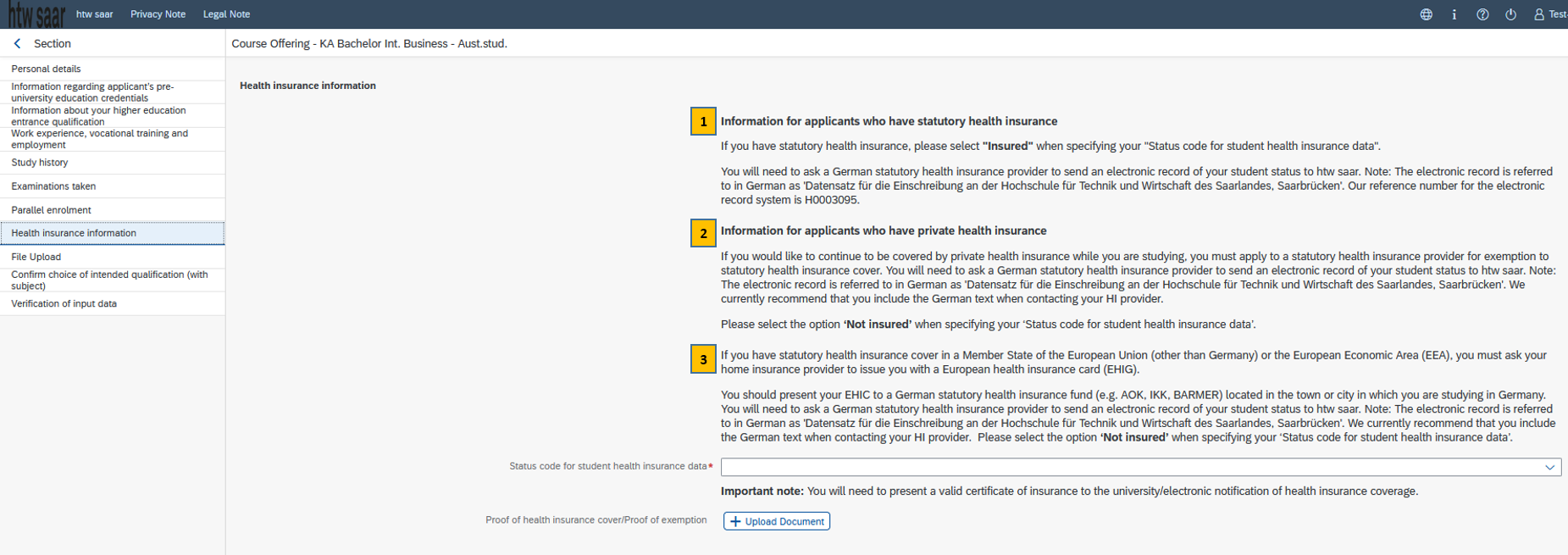
Note:
1: Statutory health insurance from a statutory Germyn health insurance fund
2: Private health insurance from outside Germany
3: Statutory health insurance from EU - Students with an EHIC card
-> In all 3 cases, please follow the instructions about health insurances here.
13. Upload your files
14. The next page about the confirmation of intended qualification is pre-filled, you do not need to enter any additional data.
15. Transfer of the semester fee
Paying the semester fee*: all exchange students need to wire the fee through a bank account that participates in the European IBAN bank transfer system (deadline is 15 March, better some days before this date!) before submitting the enrolment application. We strongly recommend that students from outside of the EU who are not able to transfer the fee through an IBAN account open a bank account with an online bank (also facilitates the next steps like transfer of the rent etc.). In some few exceptional cases, the amount can be paid in cash at htw saar’s cashiers office upon arrival. Student from outside the EU who cannot open an bank account with an online bank should send us a notice asap to incoming@htwsaar.de .
*Semester fee: this fee is not a tuition fee, but a mandatory social fee charged to all students by the student union covering free public transport in state of Saarland AND within whole Germany - the so-called “Deutschland(semester)ticket” for all busses, trams and regional trains all over Germany - as well as access to the sports and cultural facilities, food services and other student services.
Exchange students need to transfer 345,30 € to the following bank account:
Recipient: HTW Saarland
Bank: Landesbank Saar (Saar LB)
IBAN: DE67 5905 0000 0031 5200 34
BIC: SALADE55XXX
Reference: 261, your first name, last name and date of birth
16. Verification of input data / Declaration (in lieu of oath)
17. Click "Submit" in the very low right corner
18. Confirm the information you have supplied (click on "Commit")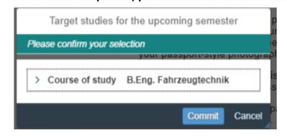
You will receive on-screen confirmation that your application was submitted and you will be notified of your "Antrags-ID", starting with 1000000.
19. Find your application as a tile in the section "My Applications" of your start page (If you do not see a new tile, please clear your browser cache using the key combination CTRL+F5)
Thank you for submitting your enrolment form by the deadline!
The htw saar Admissions Office will process your enrolment form. If the data and the uploaded documents are accurate and the semester fee has been booked to the university‘s bank account, you will receive an email of the Admissions Office about the official admission document for download, along with the IT-datasheet required for the registration of the htw saar IT infrastructure (e.g. SIM-study portal, Moodle, htw saar email account, etc.). Upon log-in to the SIM-study portal, you can download your certificate of enrolment, change your address, see your grades (after exam period). Furthermore, you will receive your student ID card, created by the Admissions Office, from the International Office by end of March/beginning of April. Last but not least, with your successful enrolment, you will be able to register for the Deutschland(semester)ticket which grants free public transport within whole Germany. Our Student Buddies will guide you through the process if required.
For enrolment (registration) at any German university, every student must have sufficient health insurance. The new online procedure between universities and the public German student health insurance funds ("Gesetzliche Krankenkassen") requires that all students enrolling in a university first contact one of the statutory health insurance funds and inform them about their upcoming studies and their current health insurance status. The German health insurance provider will then submit a digital status notification to the university, indicating whether the student holds German public health insurance or not. This electronic record serves as proof of valid health insurance for the students' enrolment. One of the following 4 cases should apply to you, depending what kind of health insurance you hold at home or if you over 30 years old. More information, see: www.htwsaar.de/en/incoming-students/preparing-your-stay/health-insurance-in-germany.
For all cases (1-4) send your notification (templates see below) via email to ONE of the selected statutory health insurers listed below, located in Saarbrücken or nearby. You can mention the German name of the electronic record required by the htw saar admission office, which is "Datensatz für die Einschreibung an der Hochschule für Technik und Wirtschaft des Saarlandes, Saarbrücken." Please note that there is typically NO confirmation message once the electronic record has been sent, neither from the health insurance fund nor from the university.
szs.kl@service.rps.aok.de
www.aok.de/pk/rps
www.aok.de/pk/rps/kontakt/aok-vor-ort/
www.aok.de/kp/uni/information-for-international-students/
service@barmer.de
https://www.barmer.de/en
info@ikk-suedwest.de
www.ikk-suedwest.de/geschaeftsstellen/saarbruecken/
https://ikk-suedwest.com/?lang=en
Submit your data via this website and follow the instructions:
Click on → ‘Nachweis erhalten’ which leads you on the page ‘Ihr Versicherungsstatus’ where you select the country in which you hold health insurance and click on ‘Weiter’. Next page asks you about ‘Befreiung Krankenversicherungspflicht’ (= exemption from statutory German student health insurance). Click on ‘Ja’ if you hold an EHIC card or have sufficient health insurance in your home country/country of studies. If not, click on 'Nein', ich möchte Mitglied der TK werden' (I want to become a member and take out health insurance with of the TK), then click on ‘Weiter’. On next page ‘Angaben zu Tätigkeiten’ select ‘Nein, nichts trifft auf mich zu’ and click on ‘Weiter’. As 'ID der Hochschule' put H0003095 and select Hochschule für Technik… and select 1.04.2026 or 1.10.2026 as 'Studienbeginn' click on ‘Weiter’. Next page: fill your personal data and click on ‘Weiter’. Next page ('Angaben zu Leistungen') fill ‘Ich habe keine Leistung bezogen’ and click on ‘Weiter’. On the following page ('Hochladen des Versicherungsnachweises') you need to submit a scan of your EHIC (Erasmus+ students who hold the European health insurance card), others who hold a private health insurance need to submit their private policy document, especially with the scope of coverage. In the latter, the TK will assess and decide if the scope is sufficient for an exemption from German student health insurance or not. Then click on ‘Weiter’.
Further questions can be addressed to: anika.schmidt@tk.de ( Student advisor: Ms. Anika Schmidt)
https://www.tk.de/en
service756200@dak.de
https://www.dak.de/dak/english-2167614.html

Austauschstudierende (Incoming, Erasmus+) | Erasmus+ incoming exchange students

Austauschstudierende (Incoming, außerhald EU) | Incoming students outside EU & Kurzaufenthalte | Short-term blended mobilities